Chrome Maps scrapers
Map Lead Scraper, G Maps Extractor, Leads Sniper: an honest look
A browser extension is the right tool for 200 rows. This page says where that stops being true, and it says plainly that we do not ship one.
We ship no Chrome extensionNo browser left openFixed 64-column export
How a Chrome Maps scraper works
You run a Maps search. A panel appears beside it. You press a button and the rows on your screen turn into a CSV.
That is the whole idea, and it is a good one. No account setup, no crawl to schedule, no credits to reason about.
Map Lead Scraper, G Maps Extractor, Leads Sniper and a dozen others all work this way. They differ on price, fields and polish.
What the well-known ones offer
Checked against their own sites on the date at the foot of the table below.
- G Maps Extractor ships an extension, a cloud scraper and an API. The free tier gives 1,000 credits a month with no card.
- Leads Sniper runs in Chrome and Edge, claims 60 or more fields, and sells a one-time lifetime licence.
- Map Lead Scraper works in the browser sidebar and offers a free monthly export allowance.
G Maps Extractor says something useful on their own site. Their extension can pull saved place lists, and it is slower than their cloud scraper. That is a fair thing for a vendor to admit.
When the extension is the right answer
You want the top 200 dentists in one city, once. Buy the extension. Do not read the rest of this page.
You are testing whether a niche is worth working at all. A hundred rows tells you that for a few euros.
You work one city and you know it. A tool that reads your screen matches how you already search.
These tools are cheap and they are fast. For a small one-off job they are a better buy than any subscription, ours included.
A browser extension against a hosted index
This table is about the shape of the tool, not about one brand. The extension column holds what is true of the category.
| FindAndClose | Chrome extension | |
|---|---|---|
| Cost of a first listfree tiers are common in this category | From $49 a month | Free to a few euros |
| Time to first row | Sign up, filter, export | Install and press a button |
| Works on a search you already ran | No | Yes |
| Runs on your machine and your IPtheir cost, and their risk | Runs on ours | Runs on yours |
| Browser stays open for the whole job | No | Yes |
| Reads only what Maps loadedone Maps search stops feeding after a couple of hundred rows | Reads the stored index | Reads the page |
| Whole-country pull in one action | Yes | No |
| Deduplicated across every search | Yes | Merge the files yourself |
| Survives a Maps layout changea DOM change breaks a page reader | Yes | No |
| Region-level counts before you export | Yes | No |
| MX check on the email domain | Yes | Varies by tool |
| Fixed 64-column export contract | Yes | Varies by tool |
| Suppression list across future exports | Yes | No |
| We ship a Chrome extensionwe do not, and we will not imply we do | No | Yes |
Chrome extension's pricing and features last checked on 26 July 2026. We re-check every month. Rows shaded grey are ones where they beat us.
Prices and free tiers in this category move often. Check the vendor page before you buy. Nothing above is a claim about one named product beyond what that product publishes.
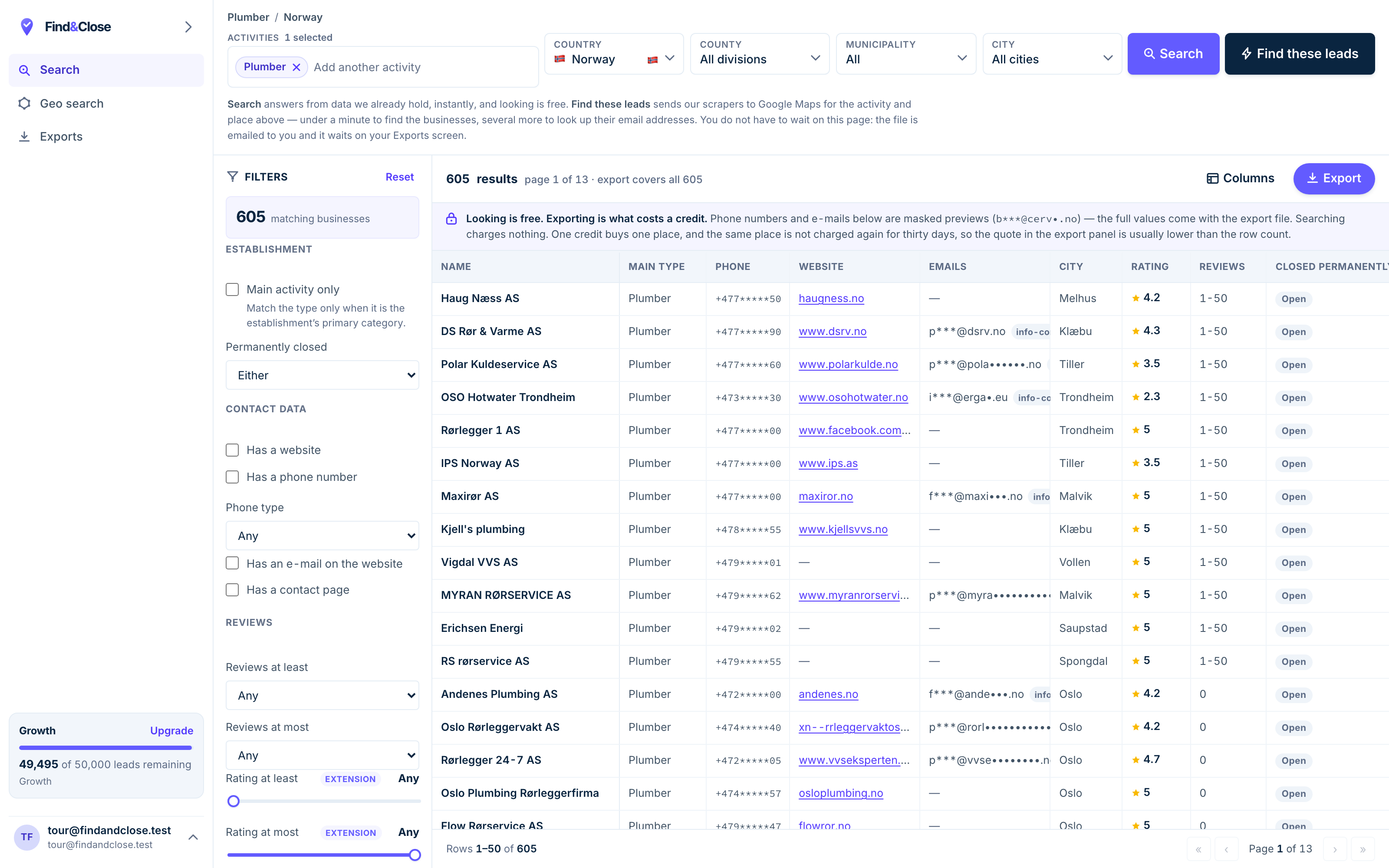
- Pick the trade Type it and take the match. One trade or twenty, on every plan.
- Pick the place Country, county, municipality, city. No plan gates the geography.
- The count moves first The number updates before you spend anything. Looking is free.
- Filter to the ones worth calling Has email, has phone, has a website, has a contact page. Combine them freely.
- Contacts are masked until export You can see a row exists and judge it. The address itself is the product.
- Export what you are looking at The file is exactly this filter set, with nothing dropped in between.
The four limits, named plainly
None of these are bugs. They fall out of the design, and no vendor can code around them.
One. It reads your screen
An extension reads the page Maps drew. Maps stops feeding a single search after a couple of hundred results.
So the ceiling is not the tool. The ceiling is the search box. To get a country you run hundreds of searches by hand and stitch the files.
Vendors work around this with grid searches and post code lists. That helps, and it moves the work to you.
Two. It runs on your machine and your IP
Your laptop does the work. Your home or office address makes the requests.
For 200 rows that is fine. For 20,000 it is your bandwidth, your fan noise and your afternoon.
It is also your IP that Google sees. A hosted tool takes that on itself, which is part of what a subscription buys.
Three. It breaks when Maps changes
A page reader depends on the shape of the page. Google changes that shape without warning.
When it changes, the extension returns empty cells until the vendor ships a patch. Every tool in this category has had that week.
A stored index has the same problem upstream, and it hits us, not you. Your file still works while we fix the crawler.
Four. It does not dedup across searches
Run "plumber Oslo" and "rørlegger Oslo" and you get two files with heavy overlap.
Merging them is a spreadsheet job, and matching on name and address is fiddly and wrong at the edges.
We match on the Google ID, so a firm you already hold never becomes a second row or a second credit.
So who should stay on the extension
If your yearly need is a few thousand rows in one city, stay. You will spend less and you will get the job done.
Come back when you want a country, a repeatable file, or a schema your CRM can rely on. That is the line, and it is not a marketing line.
Questions about browser scrapers
Do you have a Chrome extension?
No. We do not ship one, and we will not hint that we do.
FindAndClose is a hosted app. You search, filter and export from the web app, and the crawl runs on our machines.
Are Chrome Maps scrapers safe to install?
An extension that reads Maps needs permission to read pages. Read the permission list before you install anything.
Prefer vendors with a real company page, a support address and a privacy policy. Treat a free tool with broad permissions and no named owner as a risk.
Will an extension get my Google account banned?
We have no data on account action, so we will not claim a number.
What we can say is mechanical. Heavy automated browsing from one IP looks like automated browsing. Google may show you a challenge page. Read the terms of any service before you automate against it.
How many rows can one extension pull in a day?
That depends on the vendor cap, your connection and how long you leave the browser open.
The harder ceiling is per search. Maps only feeds a couple of hundred results for one query, whatever tool is reading them.
Can I use an extension and FindAndClose together?
Yes, and some people do. Use the extension for a quick look at a street or a competitor.
Use the index when you want the whole trade in a country, with counts, filters and a file you can repeat next quarter.
Is scraping public business data legal?
The fields on a Maps listing are public business data, published by the firm itself. For B2B contact, GDPR treats that as a legitimate interest case.
You must name yourself and offer an opt-out in the first message. You should also read the terms of any service you automate against. Our position is written up in the FAQ.
Read next
The other three routes to the same rows, and the lists they feed.
- FindAndClose vs D7 Lead Finder Bulk searches vs a fixed file
- FindAndClose vs Lobstr.io Crawler runs vs a queryable index
- FindAndClose and Clay Source here, enrich there
- Google Maps scraper: the four routes The plain guide
- Every list we publish The full index
- Plumbers in Norway 605 records
- Electricians in Norway 602 records
- Accountants in Norway 851 records
When 200 rows stops being enough
Take a whole trade in a whole country, with the counts on screen before you export. Fourteen days, 100 leads, no card.
- 14-day free trial
- 100 leads included
- No credit card