Compared · PersistIQ
PersistIQ dials the number. We find the businesses worth dialling.
We do not send email and we do not place calls. We pull local business rows out of Google Maps, with the phone number attached to each one.
We never send emailPhone on the rowNordics first
What PersistIQ does that we do not
The concession first. PersistIQ has been at this longer than most of the tools in its category, and the parts it built are still the parts we lack.
It runs sequences of emails, calls and manual tasks in one campaign.
It has a dialer built in on the higher tier, with call recording and per-minute billing passed straight through.
It syncs both ways with a CRM, which is the feature its users tend to name first.
It has a browser extension for building lists off LinkedIn, and it reports on replies, sentiment and meetings.
We do none of that. No email sending. No dialer. No CRM sync. No task queue. No reply reporting.
We do not send email and we do not place calls. If you are shopping for a sales engagement tool, we are not one. We are the list that goes into it.
Where its prospecting stops
Their extension builds lists off LinkedIn. That is the right tool for selling into offices.
It is the wrong tool for local business, and not through any fault of the design.
A one-van electrician in Stavanger has no LinkedIn profile. Nor does the salon on the corner, or the driving school, or the garage.
Those owners publish in one place instead. A Google Maps listing, with a phone number, opening hours, a star rating and a review count.
So the prospecting half of a sales engagement tool has nothing to grip. The dialer works fine. The list to dial is the missing piece.
That gap is the whole reason this page exists. We fill it, and we fill nothing else.
PersistIQ and FindAndClose, on where a list comes from
Their sequencing, dialing and CRM features all sit shaded below as wins. The rows above them cover the only thing we do: sourcing the list.
| FindAndClose | PersistIQ | |
|---|---|---|
| Where the list comes from | Google Maps, crawled by us | Their browser extension, off LinkedIn |
| A record is centred on | The business | The person and their profile |
| Works on businesses with no LinkedInmost local trades | Yes | No |
| Filter by map categoryover 4,000 of them | Yes | No |
| Filter for businesses with no website | Yes | No |
| Rating and review count on the row | Yes | No |
| Business phone number on the row | Where the listing holds one | Found per contact |
| Whole-country pull in one search | Yes | Profile by profile |
| Named-contact job titles | No | Yes |
| Columns in the export | 64, on every plan | Contact fields plus CRM fields |
| Past exports after you cancel | Yours, we delete nothing | Ask them before you cancel |
| How it is billed | Per plan, from $49 a month | Per seat, per month |
| Sends the email | No | Yes |
| Phone dialer with call recording | No | On their higher tier |
| Calls billed by the minute | No | Passed through at cost |
| Two-way CRM sync | No | Yes |
| Call, email and task steps in one campaign | No | Yes |
| Reply sentiment and meeting reporting | No | Yes |
| A/B testing on a sequence | No | Yes |
PersistIQ's pricing and features last checked on 26 July 2026. We re-check every month. Rows shaded grey are ones where they beat us.
Their feature set and their voice billing come from their own site and help centre on the date above. Their pricing page sits behind a bot check, so we describe the model and quote no seat price. Check it yourself before you decide.
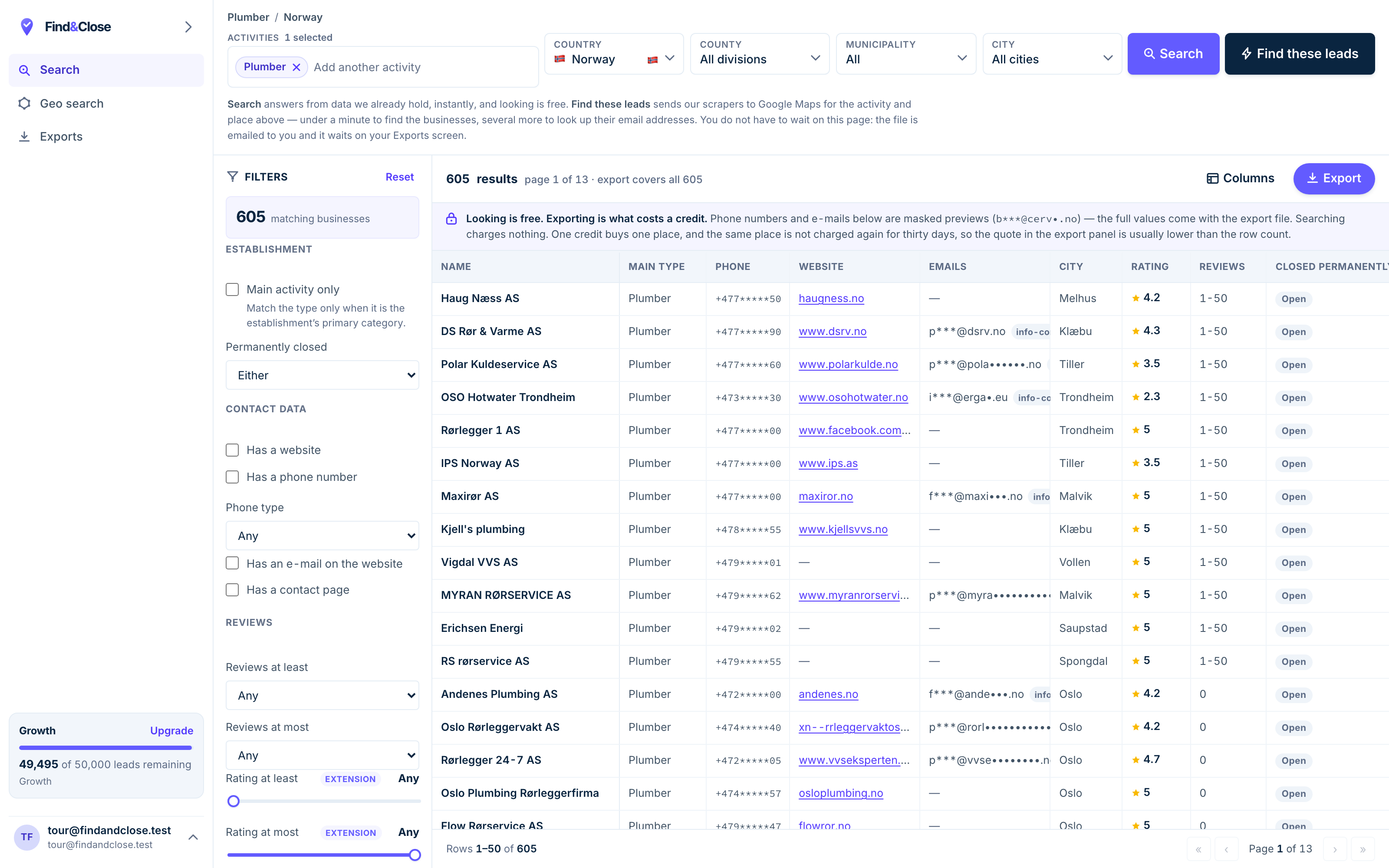
- Pick the trade Type it and take the match. One trade or twenty, on every plan.
- Pick the place Country, county, municipality, city. No plan gates the geography.
- The count moves first The number updates before you spend anything. Looking is free.
- Filter to the ones worth calling Has email, has phone, has a website, has a contact page. Combine them freely.
- Contacts are masked until export You can see a row exists and judge it. The address itself is the product.
- Export what you are looking at The file is exactly this filter set, with nothing dropped in between.
Email and phone, off one file, in four steps
This is the loop for a local campaign that uses both channels. We cover the first three steps. Their tool covers the fourth.
-
Pick the country and the trade. Electricians in Norway. Accountants in Norway. Garages in Sweden.
Watch the count settle. That is the true size of the market, not an estimate.
A trade plus a country is a market you can work through. A job title plus a country is a query that returns strangers.
-
Keep only the rows with a phone number if calling is your main channel.
Tick No website to find the owners with the widest gap and the shortest decision chain.
Narrow to one region so your caller has a week of work, not a year of it.
Callers work better with a short, dense list. A regional file also means one accent, one market and one story.
-
Export the file. Keep name, phone, email, town, trade, rating, review count and the website flag.
The phone column carries a flag for mobile numbers, which matters when you decide who to call first.
Both channels run off one export. You never have to reconcile a call list against an email list.
-
Import the CSV and map the columns to your fields. Push them into the CRM on the same sync.
Build the campaign as they intend it. An email, a wait, a call task, another email.
Dial from their tool, log the call to the CRM, and let the sequence carry on.
Their strength is the mixed sequence and the CRM write-back. Our job ends the moment the file lands there.
What a local list changes about your call and email results
We will not quote a connect rate or a reply rate. We have not run your campaign. The mechanism, though, is plain enough to check yourself.
A mixed email and call sequence lives or dies on the file, not the cadence.
A business number connects where a direct dial does not
Direct dials for named staff are the right target in a 500-person firm. In a two-person trade there is no such thing.
The number on the map listing is the number the owner answers. It is often the only one.
We carry it on the row where Maps holds one, with a flag for mobile. Your dialer does the rest.
The no-website rows shorten the whole sequence
A business with no website has no agency and no marketing budget to defend. The person answering owns the decision.
That removes two steps from a normal sequence. There is nobody to forward you to, and nobody to check with.
Contact databases cannot filter on this, because they start from people. We start from the listing, so the column is either full or empty.
Regional batching keeps a caller sane
A caller working one county learns the market in a day. The same caller working a whole country learns nothing.
Batch by region, run a week, and read the result. Then change one line and run the next region.
Your email step stays low-volume at the same time, which keeps your domain out of trouble.
Every filter above is on every plan. Geography, categories and all 64 columns come with the $49 tier. Credits, seats and API rate are what change as you go up.
Questions from teams weighing a move
Do you send email?
No. We do not send email and we do not place calls.
There is no sequencer here, no dialer and no CRM sync. We build the list and hand you a file.
So can FindAndClose replace PersistIQ?
No, and we will not let a search phrase turn that into a yes.
They run sequences, calls, tasks and CRM sync. We run none of it.
What we can replace is the prospecting half. If you are weighing a move, the list is the piece that travels with you.
What does PersistIQ cost?
They bill per seat, per month, with a lower rate on annual terms and a free trial on every plan.
The dialer sits on their higher tier, and call minutes bill on top at pass-through cost with a monthly fee per number.
Their pricing page sits behind a bot check we will not work around, so we quote no seat price here. Read it on their own site.
Will the export load into a CRM?
The file is CSV or XLSX on every plan, with JSON from Growth and Parquet on Scale.
Our headers match scrap.io column for column, so an import mapping you already built keeps working.
We hold no CRM connector of our own. The file goes through your sales tool or your own importer.
How many of these businesses have a phone number?
Most of them, and every list page on this site prints the real count for that trade and country.
We never estimate those figures. They come out of the live database on the day the page was last built.
Look at plumbers in Norway or electricians in Norway to see the split.
Is this legal for cold outreach?
Every field comes off a public map listing that the business published itself.
Under GDPR that is legitimate interest for B2B contact, and your first message must carry an opt-out.
We keep a suppression list per account, and a domain you add there stays blocked on every future export. Read our full position.
Where to go next
The other three senders, the full index, and three lists people pull on day one.
- Instantly and FindAndClose The sending half and the list half
- Lemlist and FindAndClose Personalisation needs fields to work with
- Smartlead and FindAndClose Unlimited mailboxes, finite list
- Every list we publish Trades, countries and guides
- Plumbers in Norway With phone, email and rating
- Electricians in Norway With the no-website flag
- Accountants in Norway The largest Nordic file we hold
Bring your own list, for once
Fourteen days, 100 leads, no card. Pull one trade in one region, keep the phone column, and hand it to the tool you already run.
- 14-day free trial
- 100 leads included
- No credit card