Compared · Smartlead
Smartlead gives you unlimited mailboxes. We give you something to put in them.
We do not send email. Their sending infrastructure is the point of buying them. We build the local lists that keep it busy.
We never send emailExports stay yoursNordics first
What Smartlead does that we do not
The concession, up front. If you run an agency, their product solves a problem we have never touched.
Smartlead sells sending infrastructure. Unlimited mailboxes on every tier is the headline, and it is a real one.
Add a warmup pool, client workspaces, white-label on the top tier, an API on the unlimited plans, and a master inbox across every campaign.
That is an agency stack. One dashboard, many clients, your logo on it.
We ship none of it. No sending. No mailboxes. No warmup. No white label. No dialer.
We do not send email. If you came here looking to move your sending, we are the wrong tab. This page is about what you load into the sender.
Unlimited pipe, finite list
An agency hits the list problem harder than anyone, and it hits it again with every new client.
Client one sells roofing software. Client two sells card terminals to salons. Client three does bookkeeping for garages.
Three clients, three verticals, three geographies. Each one needs a fresh file, and none of them will accept the same rows twice.
Which is where a contact database runs out. It indexes people at companies, so it can find a marketing manager in a 200-person firm. It cannot list every salon in Aarhus.
Unlimited mailboxes with a thin list is an empty pipe. The bottleneck moves to the file, and it stays there.
Smartlead and FindAndClose, on the data half
Every sending and agency feature below is theirs, shaded and conceded. The live comparison is the top block: where the rows come from.
| FindAndClose | Smartlead | |
|---|---|---|
| Where the list comes from | Google Maps, crawled by us | Their prospecting add-on |
| A record is centred on | The business | The person and their role |
| Local trades by map categoryover 4,000 categories | Yes | No |
| Filter for businesses with no website | Yes | No |
| Rating and review count | Yes | No |
| Region and postcode filters | Yes | Location filters only |
| Role-based filters for office buyers | No | Yes |
| Data half billed as | Credits inside your plan | A flat monthly add-on fee |
| Columns in the export | 64, on every plan | Contact and company fields |
| Seats included | 1, 5, then unlimited by tier | Client workspaces on top tiers |
| Past exports after you cancelthe row an agency should read twice | Yours, we delete nothing | Ask them before you cancel |
| Entry price | $49 a month, 10,000 credits | $39 a month |
| Sends the email | No | Yes |
| Unlimited mailboxes | No | On every tier |
| Warmup pool | No | Yes |
| Inbox rotation and a master inbox | No | Yes |
| White-label client dashboards | No | Add-on, per workspace |
| Sending API and webhooks | No | On the unlimited tiers |
| Bounce and deliverability reporting | No | Yes |
Smartlead's pricing and features last checked on 26 July 2026. We re-check every month. Rows shaded grey are ones where they beat us.
Prices and plan limits come off their own pricing page on the date above. Annual billing lowers each of their tiers, and the white-label workspace carries its own monthly fee.
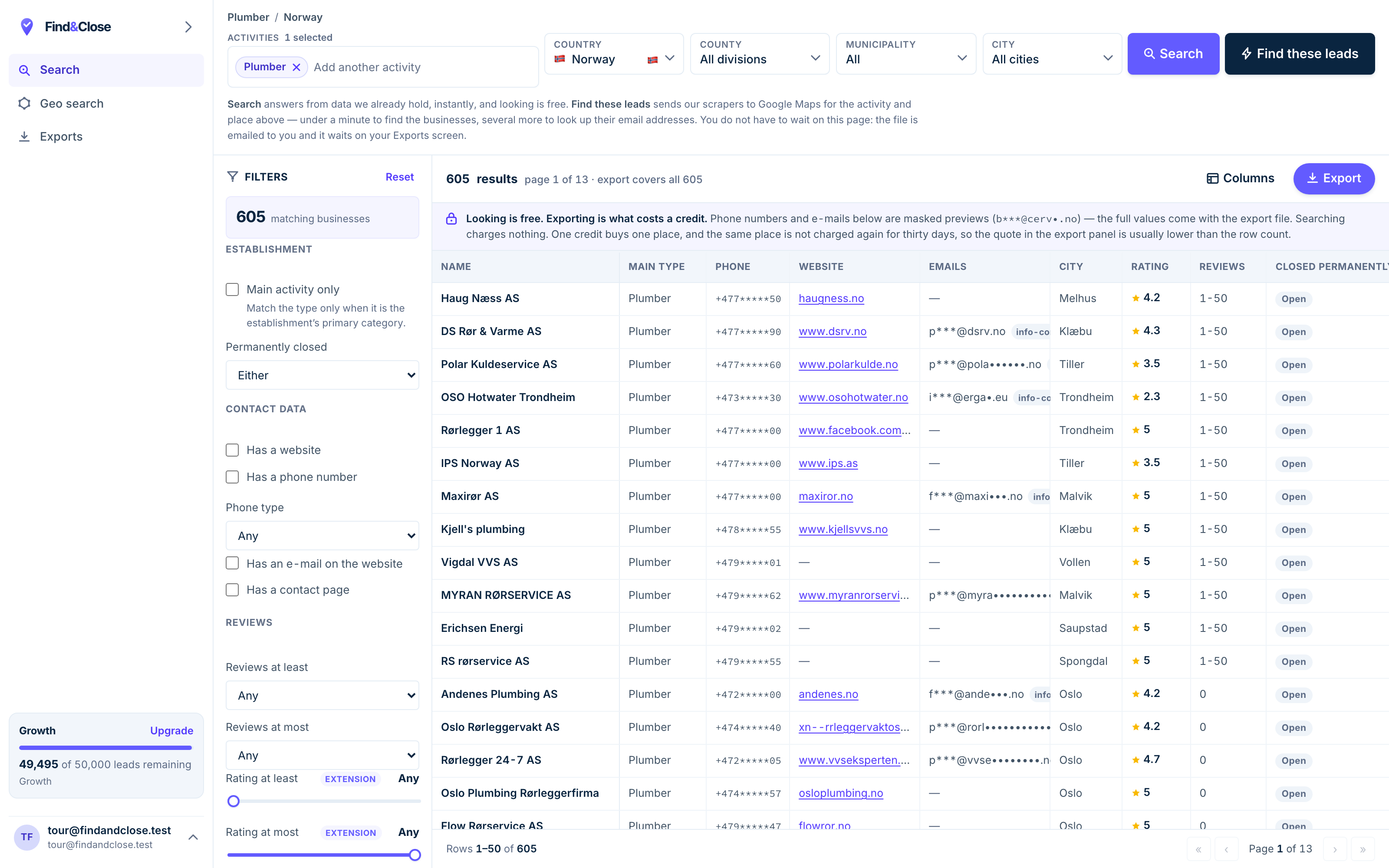
- Pick the trade Type it and take the match. One trade or twenty, on every plan.
- Pick the place Country, county, municipality, city. No plan gates the geography.
- The count moves first The number updates before you spend anything. Looking is free.
- Filter to the ones worth calling Has email, has phone, has a website, has a contact page. Combine them freely.
- Contacts are masked until export You can see a row exists and judge it. The address itself is the product.
- Export what you are looking at The file is exactly this filter set, with nothing dropped in between.
One client, one file, four steps
This is the loop an agency runs per client. Build here, send there, and hand the file over at the end.
-
Take the client brief and turn it into two fields. Which trade, and which country.
Pick both in the app. The count in the corner tells you the size of the market before you promise anything.
You can size a campaign in the pitch meeting. That alone changes how the scoping call goes.
-
Cut to the segment the client sells to. Tick No website for the greenfield rows.
Split by region so each week has its own batch, and each batch has its own report line.
Add the client domain to your suppression list so their own customers never land in the file.
Suppression per account is the difference between a clean report and an awkward call.
-
Export to CSV or XLSX. Growth adds JSON, and Scale adds Parquet for the ones with a warehouse.
Sixty-four columns arrive on every plan, and our headers match scrap.io column for column.
A mapping you built once keeps working. Nobody wants to redo field mapping per client.
-
Load the CSV into that client workspace. Point it at their mailbox pool.
Run the send with their warmup, their rotation and their reporting.
When the retainer ends, the file goes to the client. It stays readable, because it never depended on our login.
Your export survives cancellation on our side. That makes the handover a file transfer, not a negotiation.
What a local list changes about agency reply rates
We are not going to quote a reply rate for a campaign we did not run. What follows is the mechanism, which you can check against your own numbers.
Three levers move, and none of them are copy tricks.
A no-website filter removes your worst conversations
Half of an agency prospecting list is people who already bought. They have an incumbent, a contract and an opinion.
The no-website rows have none of those. No agency, no budget line, no committee.
We can flag this because we start from the map listing. A contact database starts from people, so it never sees the field.
Phone fallback saves the batch you already paid for
Owners of small trades read email late and rarely reply in kind. That is not a deliverability failure.
Every row carries the business phone where the listing holds one. So the email step becomes a warm call list.
One file drives both steps. Your junior caller works the same rows the sequencer already touched.
Regional batching turns a campaign into a test
A country-wide blast gives you one number and no lesson. A county gives you a clean read.
Run one region a week. Change one variable. Read the next region against the last one.
Your mailbox load stays flat while your learning rate goes up. That suits the way their pool works.
No geography wall here. The $49 tier searches every country with every filter and all 64 columns. Seats, credits, rollover and API rate are what move with the tier.
Agency questions we get most
Do you send email?
No. We hold no mailboxes and run no warmup pool.
Keep Smartlead for the sending. We are the file that goes into it.
Can I resell the data to my client?
You can put the rows to work for the client you bought them for, and hand over the export at the end.
What you cannot do is republish our file as a database of your own. The terms set out the line.
What happens to my exports if I cancel?
Nothing. Your files stay on your machine and in your CRM, and we delete no past export.
That matters more for an agency than for anyone else. A client handover should never depend on a live login.
How many seats do I get?
Starter is one seat at $49. Growth is five seats at $99. Scale is unlimited seats at $249.
Every tier searches every country with every filter. Only credits, seats, rollover and API rate move.
Is there an API?
Yes, from Growth up. Growth runs at 10 requests a second, Scale at 50, and Enterprise at 200.
Teams pipe the rows into their own tooling and push the CSV out the other end.
How fresh are the rows?
We re-crawl the Nordics on a rolling schedule. A closed business drops out and a new one appears without you asking.
Every row carries a first-seen and a last-seen date, so you always know how old it is.
Where to go next
The other three senders, the full index, and three lists people pull on day one.
- Instantly and FindAndClose The sending half and the list half
- Lemlist and FindAndClose Personalisation needs fields to work with
- PersistIQ and FindAndClose A dialer needs phone numbers
- Every list we publish Trades, countries and guides
- Plumbers in Norway With phone, email and rating
- Electricians in Norway With the no-website flag
- Accountants in Norway The largest Nordic file we hold
Fill the mailboxes you already pay for
Fourteen days, 100 leads, no card. Size one client vertical, pull the region, and load it into the workspace tonight.
- 14-day free trial
- 100 leads included
- No credit card