Compared · Google Places API
The Google Maps API alternative for people who want a file
The API bills per request and sets rules on what you may store. A list is a file with a fixed price. Different tools, different jobs.
Flat monthly price64 columns per rowAn email on the row
What the Places API is good at
This is Google, first party. Nothing on this page beats it for freshness, and nothing ever will.
The Places API answers from Google itself. No middle layer, no crawl lag. A place that changed this morning reads as changed now.
It powers store finders, map pins, address lookup and autocomplete. For a product feature, it is the right tool. A list is not.
Pricing is public and per request. Text Search runs $32 per 1,000 calls on the Essentials and Pro tiers. Enterprise runs $35, and $40 with atmosphere fields.
Place Details runs $5 per 1,000 on Essentials. That rises to $17 on Pro, $20 on Enterprise and $25 with atmosphere data.
Each SKU carries a free monthly cap. Essentials gives 10,000 calls a month, Pro gives 5,000, Enterprise gives 1,000.
The docs are good and the uptime is Google uptime. For an engineering team it is a safe, boring, defensible choice.
If you are shipping a map inside an app, stop reading here. Use the API. This page is about buying a list, which is a different job.
Where the API wins outright
- First-party data, straight from Google
- Real time, with no crawl lag at all
- Worldwide, in every country Google maps
- Support and an SLA you can escalate to
- Autocomplete and routing, which no list can offer
The Places API and FindAndClose, row by row
Google rates came off their own pricing page on the date below. Grey rows are the ones Google wins.
| FindAndClose | Google Places API | |
|---|---|---|
| What you getModel | A file of rows | A live API response |
| FreshnessCoverage | Crawled on a cycle | Real time |
| SourceCoverage | Our own crawl | Google, first party |
| GeographyCoverage | Every country, fetched on demand | Worldwide |
| Pricing modelPricing | Flat monthly plan | Per request, by SKU |
| Text Search ratePricing · Essentials and Pro | Credits inside your plan | $32 per 1,000 calls |
| Place Details ratePricing · rises by tier | Already on the row | $5 to $25 per 1,000 |
| Free tierPricing | 14 days, 100 leads | A monthly cap per SKU |
| A bill you can forecastPricing | The same every month | It tracks your calls |
| A business email on the rowExport · not a Places field | Where we find one | No |
| A whole category in one exportExport | Yes | Call by call |
| Columns per rowExport | 64, fixed | Fields you ask for |
| Filter for businesses with no websiteFilters | Yes | Sort it out after the call |
| Rules on storing what you getOwnership | The file is yours | Read their terms |
| Engineering to get a listWorkflow | None | You write the client |
| Rate limitsSupport | API from $99, 10 to 200 a second | Quotas per project |
| Attribution rules when you display itSupport | None from us | Google branding rules apply |
| Support and an SLASupport | Email, by plan | Google Cloud support |
Google Places API's pricing and features last checked on 26 July 2026. We re-check every month. Rows shaded grey are ones where they beat us.
Google rates above are list prices for the Places API on the date shown, before any Cloud credits. Your own terms with Google always take priority over this table.
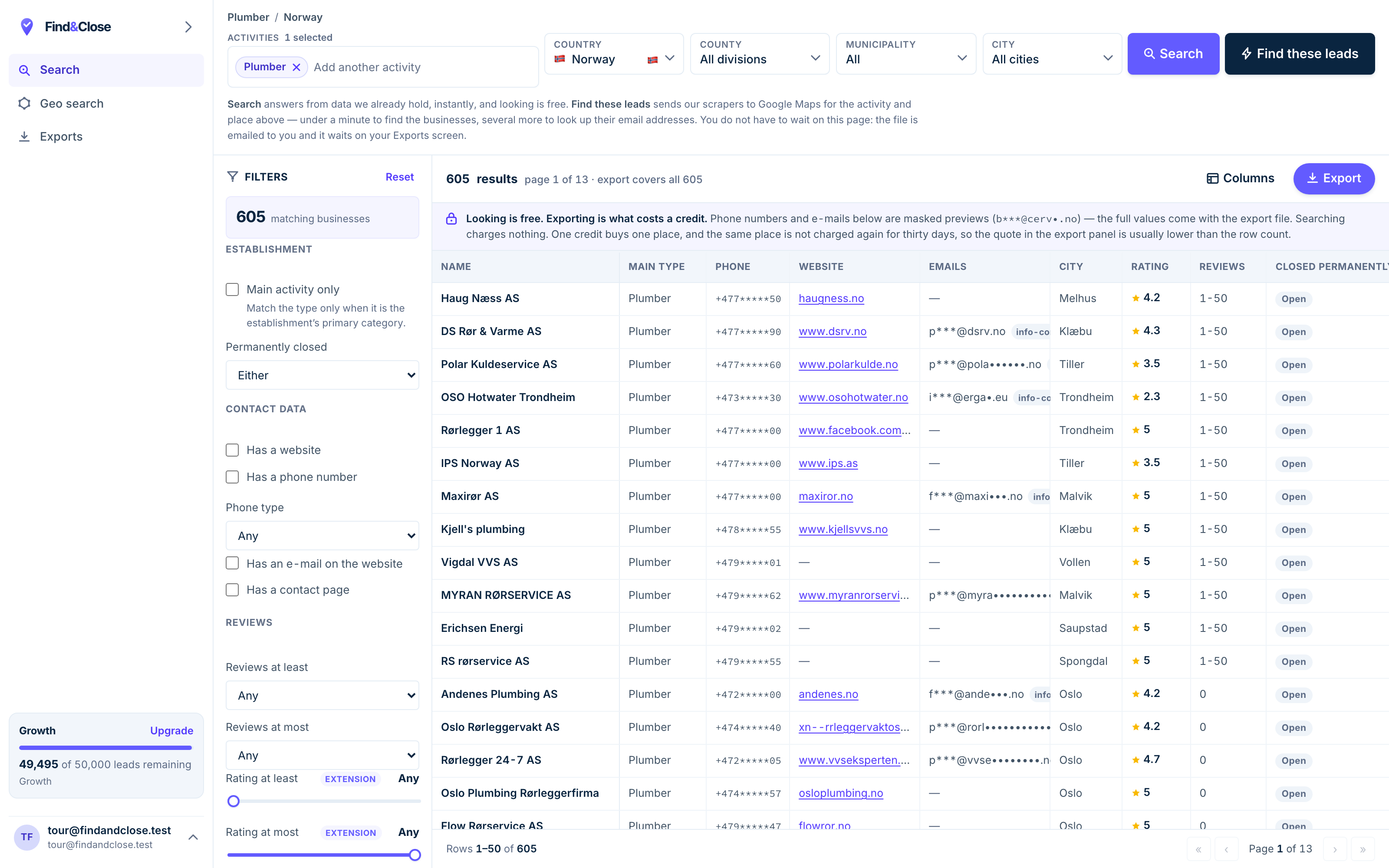
- Pick the trade Type it and take the match. One trade or twenty, on every plan.
- Pick the place Country, county, municipality, city. No plan gates the geography.
- The count moves first The number updates before you spend anything. Looking is free.
- Filter to the ones worth calling Has email, has phone, has a website, has a contact page. Combine them freely.
- Contacts are masked until export You can see a row exists and judge it. The address itself is the product.
- Export what you are looking at The file is exactly this filter set, with nothing dropped in between.
The one difference that decides it
A meter and a file are not the same product. Google’s own terms make that plain.
The API is metered
Every call has a price. Text Search is $32 per 1,000. A search that fans out across a country makes a lot of calls.
Then you add Place Details for the fields you want. That is another $5 to $25 per 1,000. The bill tracks your curiosity.
Free caps take the edge off. Essentials gives 10,000 calls a month, Pro gives 5,000, Enterprise gives 1,000. A country sweep eats those in a morning.
Our bill does not move like that. $49 a month holds 10,000 credits. $249 holds 250,000. You know the number before you start.
The terms set rules on what you keep
Google publishes rules on storage and caching. Their Maps Platform terms cover scraping in one section and caching in another.
Place IDs sit outside those limits. You may store a Place ID with no time cap on it.
Most other Places content works differently. The terms allow narrow, short-lived caching and no more than that.
We are not going to paraphrase a contract for you. Read the Google Maps Platform terms and take your own advice on them.
Nothing here tells you to break those terms, and we would not. The point is narrower. If the job is a stored list, the API is the wrong shape for the job.
And there is no email field
The Places API does not return a business email address. That is not a flaw in Google. It is a gap in your outreach.
Our rows carry an email where we find one, plus the page we found it on. So you can check our working.
That single field is why most people looking at the API end up looking at a list instead.
How to choose between them
This is not a close call once you name the job out loud. Write it down first, then pick.
- Name the job. A map feature in a product belongs on the API. A cold list does not.
- Count the calls. Search calls plus detail calls, times the places you want. Then price it.
- Read the storage rules. They decide whether a stored list is even on the table for you.
- Try the list side. 14 days, 100 leads, no card. The same businesses, in a file.
- Keep the API for the app. Most teams end up running both. That is the normal answer, not a cop-out.
Teams get stuck here because both options look like data. One is a live lookup and one is a data product.
A lookup answers a question a user just asked. A list answers a question you asked once, for tens of thousands of rows at a time.
Price them against the job and the choice makes itself. Price them against each other and you will argue all week.
Questions people ask before they move
Should I stay on the Places API?
Yes, if you are building a feature. Autocomplete, store finders and map pins belong there and nowhere else.
Yes too if you need worldwide data today. Our index covers four Nordic countries, not the planet.
Is a list against Google’s terms?
Their terms cover your use of their API and their content. We are not your lawyer and this page is not advice.
Read the Maps Platform terms, then take proper counsel on your own use case.
Why does the API cost so much for a list?
Because it prices a question, not a file. A list of a whole category means thousands of search and detail calls.
That is fine for a store finder serving one user. It is a strange way to build a spreadsheet.
Can I get an email address from the Places API?
No. Email is not a field the Places API returns.
Our export carries one where we can find it, along with the page it came from.
How fresh is your data next to a live call?
Not as fresh. A live call wins on that, and we mark it as their win in the table.
We re-crawl on a rolling schedule and stamp every page with the date we last saw the rows.
Do you have an API too?
Yes, a REST API from the $99 tier at 10 requests a second. Higher tiers run at 50 and 200.
It serves the same 64 fields as the export. See what each plan includes.
Read the other comparisons
People who price the API usually price these three next. Each page is written the same way.
Buy the file, keep the API for the app
Fourteen days, 100 leads, no card. Pull one Nordic category and see what a finished list holds.
- 14-day free trial
- 100 leads included
- No credit card