Guide · List building
How to build a local business email list
Local email does not live in a contact database. It lives on a contact page, and a lot of the time it is not there at all.
Real coverage ratesVerification without the hypeA phone-first fallback
Where local business email actually lives
This is the fact that decides everything else about your list.
A plumber has no LinkedIn profile with a work address behind it. There is no HR record, no corporate directory, no domain pattern to guess from.
The email exists in one place: a page on the firm’s own website. A contact page, a footer, a form, a mailto link, a photo of a van with an address painted on it.
So the chain runs like this.
- The Maps listing gives you the website address.
- The website gives you the email, if the owner put one there.
- No website means no contact page. No contact page means no email.
That chain has one snap point, and it is the same one every time. A firm with no website has no email for anyone to find, and no tool on earth can invent it.
This is why a no-website filter and an email filter pull against each other. The firms easiest to sell to are the ones hardest to email. Plan for both, or plan to phone.
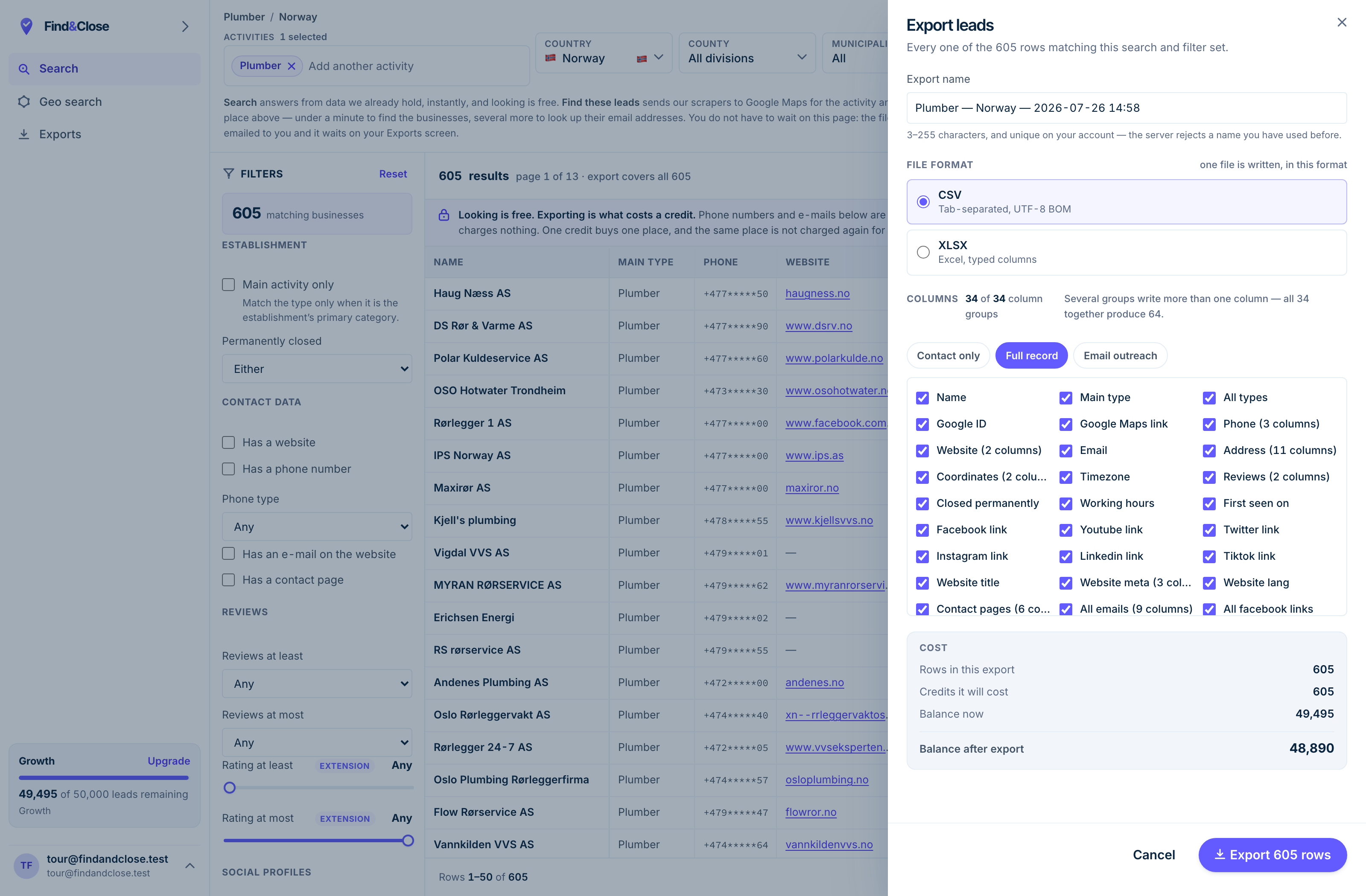
- It exports the whole result Every row the filter matched, not the page you happen to be looking at.
- CSV or XLSX Tab-separated UTF-8, or typed Excel columns. One file per job.
- 34 groups, 64 columns The same 64 on every plan. Nothing is held back for a higher tier.
- Three presets Contact only, full record, or the outreach set. Or tick your own.
- The cost, before you commit One credit per place, once per 30 days. Re-downloading is free.
Why B2B contact tools miss local firms
The big contact databases are built around a shape that local businesses do not have.
Most B2B data tools grew up on software sales. They map a company to its domain, then map people to that domain by job title.
That model needs three things. A domain, a set of named staff, and a public profile per person. A four-person joinery in Bergen has none of them.
- No domain in many cases, so the whole model has nothing to hang on.
- No named staff, because the owner is the sales team and the van driver.
- No job titles to filter by. There is one title, and it is owner.
- No pattern to guess. A firm on a free webmail address breaks every rule.
So you search a big database for painters in Aarhus and get a handful of rows, most of them wrong. The tool is not broken. It was built for a different world.
The route that does work is dull. Crawl the map, follow each website, read the contact page, keep what you find, and flag the rest as missing.
What coverage really looks like
Counted out of our own database on 26 July 2026. The four countries hold 44,684 records, of which 23,846 sit in the trades counted below.
Anyone selling you a local list with full email coverage is selling you guesses. Here is what an honest crawl returns across the trades we publish list pages for.
- Norway: 9,632 records, 38% with an email on file.
- Sweden: 6,404 records, 19% with an email.
- Denmark: 3,927 records, 17% with an email.
- Finland: 3,883 records, 16% with an email.
Norway is the outlier, and Norway is the ceiling. Three of the four countries sit under one row in five.
The spread by trade is wider still, and it is the spread you should plan around.
The two ends of the same file
Only 3% of Danish painters have an email on their listing. Buy a thousand of those rows and you get thirty addresses.
57% of Swedish opticians do have one. Same crawler, same week, nineteen times the coverage.
The difference is not our data. It is the trade. Opticians run shops with opening hours and appointment pages. Painters run vans.
So the question is never how good the data is. It is which trade you picked.
A phone-first plan on a real list beats an email-first plan on a fantasy one. Every row we hold carries a phone number more often than an email. Build the campaign around the field you actually have.
Verification, bounces, and your domain
A bounce is not a wasted email. It is a small, permanent charge against your ability to send at all.
Mailbox providers watch how often your mail hits an address that does not exist. A high bounce rate reads as a sign that you bought a stale list, and they treat you as such.
The damage lands on the sending domain, not on the campaign. Burn it, and every future email from that domain starts life in a worse place.
How verification works
A verifier opens a conversation with the receiving mail server and asks whether an address exists. It never sends a message.
The server answers in one of three ways.
- Valid. The mailbox exists and the server says so.
- Invalid. The mailbox does not exist. Drop the row.
- Catch-all or unknown. The server accepts everything, so it tells you nothing.
That third bucket is the one people misread. A catch-all domain is not a bad address. It is an address nobody can check, and small local firms sit in that bucket often.
Treat catch-all rows as a separate send, at low volume, and watch what comes back.
Rules that keep a domain healthy
- Send from a domain you can afford to lose, not from your main one.
- Set up SPF, DKIM and DMARC before the first send, not after the first problem.
- Warm the domain over weeks. A new domain sending hundreds on day one looks like what it looks like.
- Verify within days of sending. A list checked in March is a guess by June.
- Watch the bounce rate per send and stop the moment it climbs.
- Keep a suppression list and honour it forever.
None of this is exciting and all of it is load-bearing. Deliverability is the tax you pay for reaching anyone at all.
A build plan that survives thin coverage
Assume you will find an email for one row in five. Design for that and you cannot be disappointed.
- Pick the trade before the country. Trade drives coverage far harder than borders do. Check the trade first, then pick where.
- Pull the full list, not the emailed slice. You want every row, with a flag for what each one carries. The gaps are half the information.
- Split the file in two on that flag. One file with email, one without. They get different campaigns, not one campaign with holes.
- Verify the email half before you send. Drop the invalid rows. Park the catch-all rows for a small, careful test send.
- Route the rest to phone. The no-email half is not waste. It is the half your competitors never call.
- Log every reply against the row. Opt-outs go straight into suppression. Interest goes into the calendar, not into a nurture flow.
- Re-pull the list each quarter. Firms close, sites go up, addresses change. A local file decays faster than people expect.
That plan gives you two working campaigns instead of one broken one. It also stops you paying for a list and then blaming the list.
Build it yourself, or buy it
Both are fine. The choice turns on how often you need the file, not on how clever you are.
Building it yourself means a Maps crawl, a website crawl, a parser for contact pages, proxies, and a job that runs again next month. That is real engineering, and the second month is when people quit.
Buying it means a subscription and a filter. You lose the fun and you keep the afternoon.
The honest rule is need frequency. One list, once, for one town? Build it by hand and enjoy the walk. A list a month across four countries? Buy it, and spend the saved time on the sending.
Whichever way you go, hold the file to the same standard. Every row dated, every gap flagged, and no invented addresses anywhere in it.
If you want to see the shape of a finished file first, the Google Maps guide lists what a usable export holds.
Questions about local email lists
Why is email coverage so low on local lists?
Because the email lives on the firm’s website, and a lot of local firms have no website. No site, no contact page, no address to find.
Even among firms with a site, plenty use a form instead of a published address. A form is not an email you can put in a CSV.
Can you guess an email from the domain?
Tools do it, and we do not. Guessing produces addresses that look right and bounce, and the bounce lands on your domain.
We publish what we found and flag what we did not. A missing field is more useful than a plausible fake.
Is info@ a real contact or a dead end?
For a four-person firm, info@ is the owner’s inbox. That is the whole point of local. There is no reception desk between you and the decision.
For a larger firm it is a shared mailbox and the odds drop. Match the expectation to the size of the business.
How often should I refresh a local list?
Every quarter is a sane default for an active campaign. Businesses close, new ones open, and websites appear where there were none.
We date-stamp every count we publish for the same reason. A number without a date is a number you cannot trust.
Do you send the emails for me?
No. We build the list and hand you the file. The sending happens in whatever tool you already use.
That split is on purpose. Sending well needs a warmed domain and a reputation you own, and neither of those should sit with your data vendor.
What happens when somebody asks to be removed?
Add them to your suppression list and honour it forever, across every future campaign. That is the rule, and it is not a hard one.
We hold a suppression list per account. A domain you add there is blocked on every export you pull after that.
Read next
What to do with the list once the coverage question is settled.
- Find businesses with no website Four methods, honest trade-offs
- Cold email local businesses Subject lines, length, a full sequence
- Find web design clients Territory, pricing, a week of work
- GDPR and B2B cold email Legitimate interest, opt-out, suppression
- Scrape Google Maps without code What Maps exposes, and what it hides
- Every list we publish Trades and countries
- Plumbers in Norway Phone and email flags per row
- Accountants in Norway A trade that drifts off the web
- Electricians in Norway Strong email coverage for a trade
- Electricians in Sweden The Swedish side of the same trade
See the email coverage before you pay for it
Every list page shows how many rows carry an email, counted from the live file. No signup to look.
- 14-day free trial
- 100 leads included
- No credit card