Guide · Data
How to get data out of Google Maps without code
Maps holds the best local business directory in the world and gives you no way to export it. Here are four routes around that, and what each one costs.
Four routes comparedThe fields Maps hidesWhere the law sits
What Maps actually shows you
Start here, because half the confusion in this topic comes from expecting fields that were never there.
A Maps listing is filled in by two parties. Google, from its own index, and the owner, through a business profile.
What you can see on a listing:
- Name, full address, and the map coordinates
- Phone number, where the owner added one
- Website link, where the owner added one
- Category, plus the smaller categories under it
- Star rating and review count
- Opening hours, and whether it says permanently closed
- Photos, and sometimes a price level
- Whether the owner has claimed the listing
What is never on a listing:
- An email address. Maps has no email field at all.
- The owner’s name, unless it sits in the business name.
- Company number, VAT number, or staff count
- Revenue, or any hint of it
That first line is the one that matters. Email never comes from Maps. It comes from the website Maps points at, and only if the owner published one there. Anyone selling Maps data with full email coverage is selling you guesses.
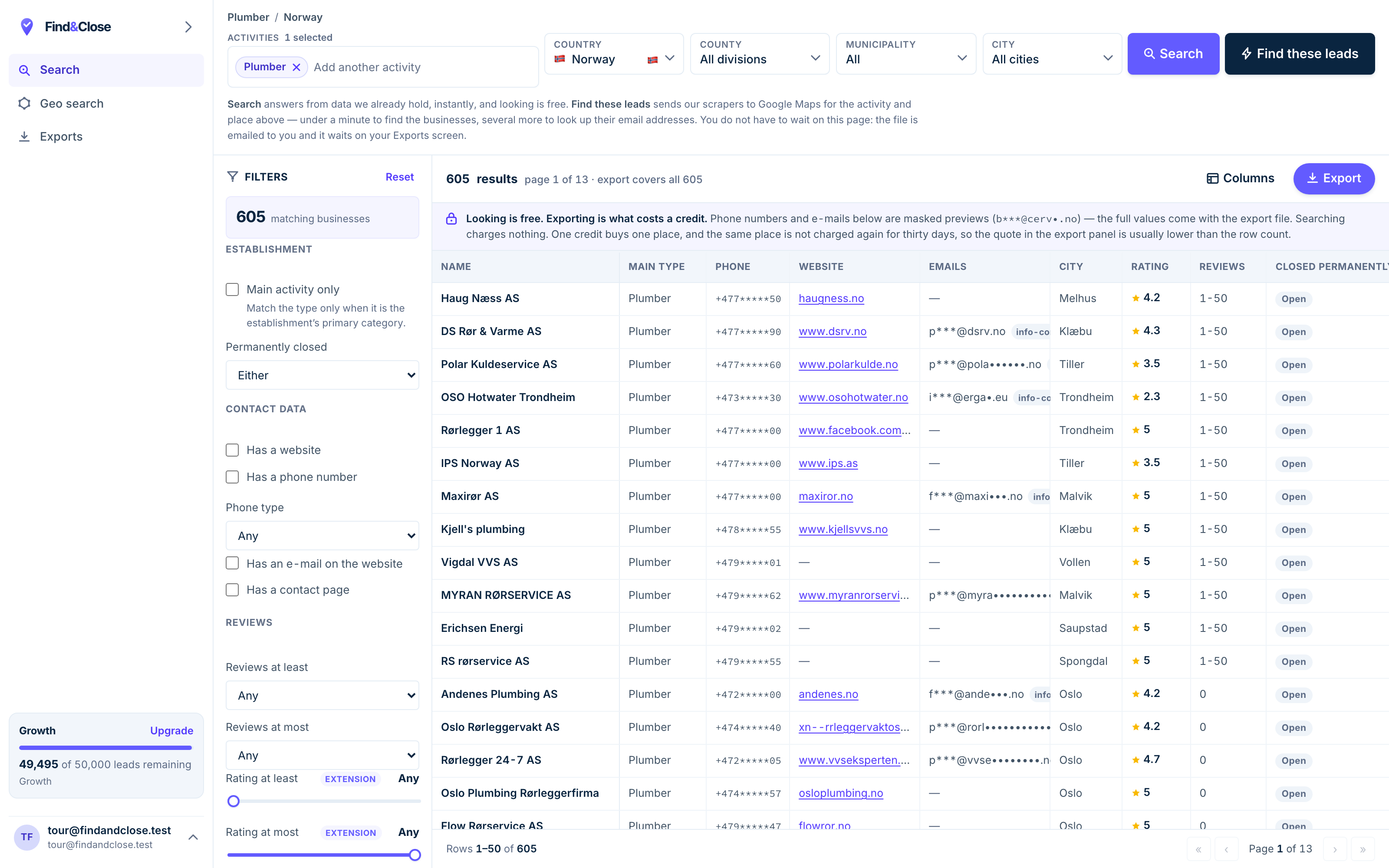
- Pick the trade Type it and take the match. One trade or twenty, on every plan.
- Pick the place Country, county, municipality, city. No plan gates the geography.
- The count moves first The number updates before you spend anything. Looking is free.
- Filter to the ones worth calling Has email, has phone, has a website, has a contact page. Combine them freely.
- Contacts are masked until export You can see a row exists and judge it. The address itself is the product.
- Export what you are looking at The file is exactly this filter set, with nothing dropped in between.
Four routes for a non-developer
Ranked by how far they get you before something breaks.
1. Copy it by hand
Open each listing and type the fields into a sheet. It sounds silly and it is the right first move.
You learn the shape of the data, you see how many firms in your trade have no site, and you spend nothing.
It falls apart at scale, and it falls apart fast. Treat it as research, not as a pipeline.
2. A browser extension
An extension reads the results page you are already looking at and writes the visible rows to CSV. Cheap, fast, no setup.
Two limits show up in week one. Maps shows a slice of results per search, so the extension never sees past that slice. And it runs on your own logged-in account, which carries account risk.
Check the terms of any tool before you install it. We do not ship an extension, so we have nothing to sell you here.
3. A hosted scraper
You give a website a search term and an area, it runs the crawl on its own machines, and you download a file.
This clears both extension limits. Nothing runs on your account, and the service can work around the per-search cap by splitting the map into smaller squares.
You pay per run, and you wait. A wide search across a country can take hours, and you pay again next month when the data goes stale.
4. An indexed database
Somebody has already run the crawl, followed each website for an email, and stored the result with a date on it. You filter and export.
This is what we sell, so weigh the next sentence accordingly. You trade freshness control for speed: the row is true as of the crawl date, not as of your click.
What you get back is the filtering. No website, has email, rating below four, unclaimed listing. Those questions are cheap against an index and painful against a live crawl.
- By hand: free, tiny, and the best teacher.
- Extension: cheap and quick, capped per search, runs on your account.
- Hosted scraper: no cap and no local risk, pay per run, slow on wide areas.
- Database: instant filters and stored emails, as fresh as the last crawl.
What a usable export holds
A file of names and phone numbers is a phone book. These are the fields that turn it into a work queue.
Our export runs 64 columns per row, on every plan. The ones that change how you work:
- Name, street, postcode, region and coordinates
- Phone, plus a flag for whether it reaches a mobile
- Email, plus the page we found it on, so you can check our working
- Website, plus a flag for the rows that have none
- Rating, review count, and whether the owner claimed the listing
- Facebook, Instagram and LinkedIn, where the listing carries them
- Opening hours, price level, and the full category tree
- First seen and last seen, so you know how old every row is
Three of those are worth more than the rest put together.
- The no-website flag. It turns a directory into a prospect list. Everything else is nice to have.
- The source page for the email. You can open it and see where the address came from. A vendor who cannot show you this is guessing.
- First seen and last seen. Age is the only honest measure of a local file. A row with no date is a row you cannot trust.
One more thing to check before you buy from anyone. Ask what happens to your file when you cancel. Ours stays yours. We do not delete customer exports, and we are not going to start.
Where the law sits on public business data
Two different questions get muddled here. Keep them apart and the answer gets clearer.
The first question is about the platform. The second is about the people in the data.
The platform question
Google’s terms govern what you may do with Google’s service. Read them before you point a tool at Maps, and read the terms of any tool you install.
We are not going to tell you to breach a terms of service, and you should be wary of any vendor that does. The Places API exists as the route Google itself offers, and it is the safest place to start.
The data protection question
A business address is not always personal data, and sometimes it is. A sole trader’s name and mobile number is personal data even though the trade is a business.
In the EU and the EEA, B2B contact for a related product usually rests on legitimate interest under Article 6(1)(f) of the GDPR. That basis is a test you have to pass, not a box you tick.
You also owe people an explanation. Article 14 of the GDPR covers what to tell someone when you got their data from somewhere else, and by when.
Our GDPR guide walks through the balancing test and the opt-out duty. None of it is legal advice.
The part everyone skips
Public does not mean unrestricted. Data being visible to anyone does not empty it of protection, and regulators have said so more than once.
The practical version is short. Use it for what a reasonable business owner would expect, keep the volume sane, honour every opt-out, and keep a record of where each row came from.
Test any source before you commit
Twenty minutes of checking beats a month of blaming the data.
- Pick a trade and town you know. Somewhere you can sanity check the answer without opening a browser.
- Count the results yourself in Maps. Rough is fine. You want to know whether the tool returns a tenth of the market or most of it.
- Check ten rows by hand. Open the listing. Does the phone match? Does the no-website flag hold up? Is the firm still open?
- Look for the date. If the file carries no crawl date, you have no idea what you bought. Walk away.
- Test the email fields. Open the source page for three of them. If the vendor cannot show a source, the address is a guess.
- Ask what happens on cancellation. Some tools delete your exports when you stop paying. Ask in writing before you start.
Run that on any vendor, including us. A file that survives it is a file you can build a quarter on.
Questions about getting data out of Maps
Can I export a list from Google Maps directly?
No. Maps has no export button for search results, and it is not an accident. The directory is the product.
Everything in this guide is a way around that gap, from typing rows by hand to buying an indexed copy.
Does Google Maps have email addresses?
No. There is no email field on a Maps listing, so no Maps scraper can read one out of Maps.
Email comes from the business website, which Maps links to. That is a second crawl, and it only works where the owner published an address.
Why do scrapers stop at a limited number of results?
Maps returns a slice of results per search, and a tool reading that page can only see the slice it was given.
The way around it is many small searches instead of one big one. Split an area into squares, or split a category into its smaller categories.
Is scraping public business data legal?
Public business contact data is widely used for B2B outreach in Europe, and the usual basis is legitimate interest under Article 6(1)(f) of the GDPR.
That is not the same as a free pass. You still owe an opt-out, a source disclosure and a balancing test, and the platform’s own terms are a separate question. This is not legal advice.
What does FindAndClose actually source from?
Google Maps today. Apple Maps and Bing Maps are on the roadmap and are not live, and we will not describe them as shipping until they are.
Coverage today is Norway, Sweden, Denmark and Finland: 44,684 records as of 26 July 2026.
How current is an indexed database?
Ours carries a first seen and last seen date on every row, and every count we publish is stamped with the day we counted it.
That is the honest answer to a freshness question. A vendor who will not date the file is asking you to trust a number with no age.
Read next
What to do with the file once you have chosen how to get it.
- Find businesses with no website Four methods, honest trade-offs
- Build a local business email list Where the addresses really live
- Cold email local businesses Subject lines, length, a full sequence
- Find web design clients Territory, pricing, a week of work
- GDPR and B2B cold email Legitimate interest, opt-out, suppression
- Every list we publish Trades and countries
- Plumbers in Norway Phone and email flags per row
- Accountants in Norway A trade that drifts off the web
- Electricians in Norway Strong email coverage for a trade
- Electricians in Sweden The Swedish side of the same trade
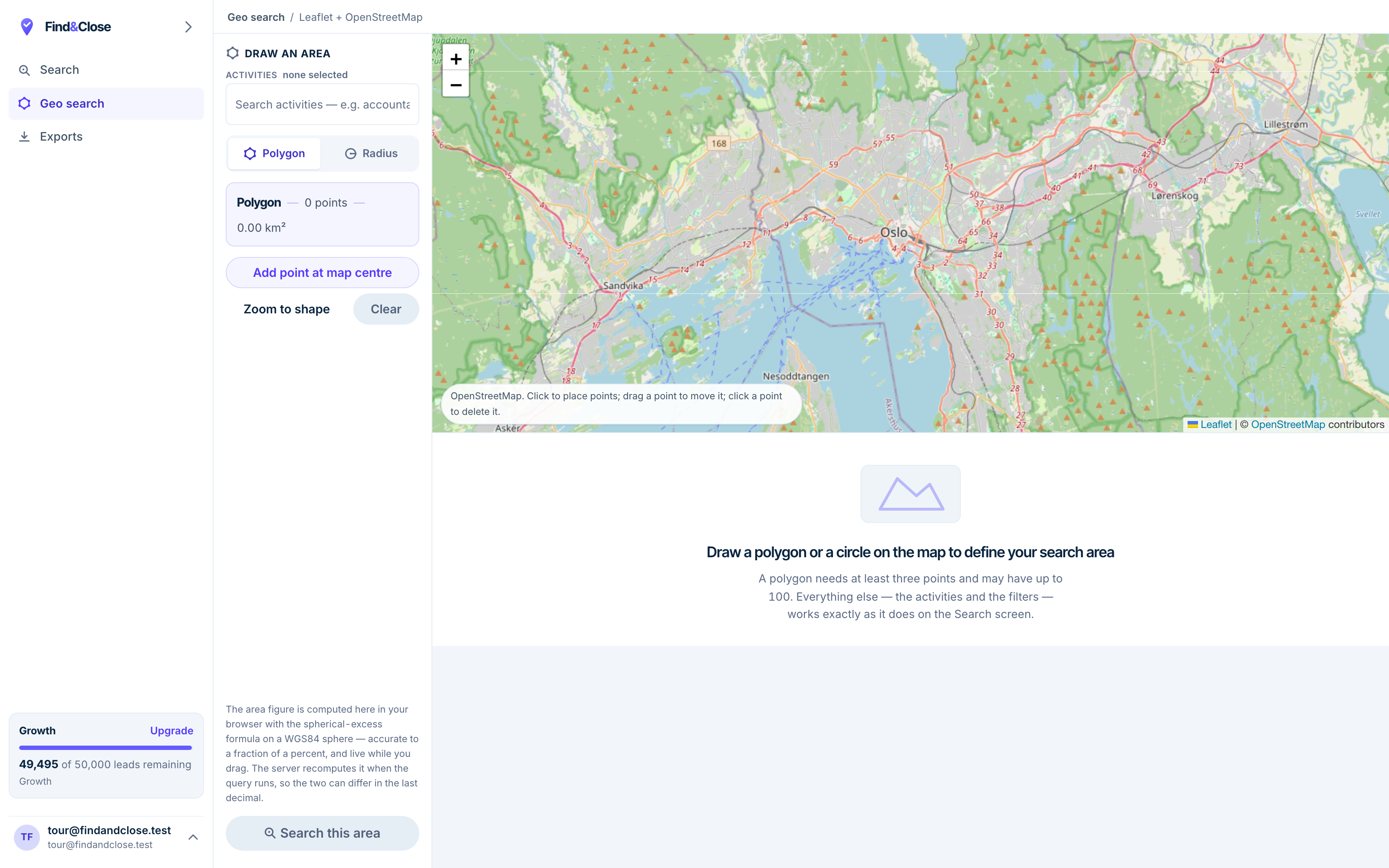
- Polygon or radius Up to a hundred points, or a circle around any address.
- The area is live Square kilometres update as you drag, computed in your browser.
- Real map, real boundaries The shape is yours, so the territory is not limited to the ones we predrew.
- Same filters as Search Trade, contact data, ratings and reviews all apply inside the shape.
Skip the crawl and filter instead
Fourteen days, 100 leads, no card. Pull one trade in one country and check ten rows by hand before you decide.
- 14-day free trial
- 100 leads included
- No credit card